


Network Cabling Decommissioning, Upgrades, and Upkeep Made Simple

Old network cabling rarely fails all at once. It usually causes slower tickets first: mystery disconnects, unlabeled ports, crowded racks, warm closets, and patch panels no one wants to touch. By the time a full cleanup becomes urgent, the cable plant may already be slowing down moves, security work, Wi-Fi upgrades, and daily support.
Network cabling is easy to ignore because it sits above ceilings, behind racks, and inside walls. Yet it supports almost every system a building relies on: internet access, phones, access control, cameras, point-of-sale devices, wireless access points, printers, and building controls.
Whether the job is decommissioning old cable, upgrading to support faster equipment, or keeping the current system healthy, the same rule applies: a clean cable plant is easier to secure, troubleshoot, and grow.

Start with a clear inventory before changing anything
Good cabling work starts with knowing what is there. That sounds simple until a rack has grown for years without consistent labeling. A cable may look unused, but it could still feed a camera, badge reader, lab device, wireless access point, or emergency phone.
Before unplugging or cutting anything, build an inventory that covers both the physical cable and the service it supports.
A practical inventory includes:
Cable type, such as Cat5e, Cat6, Cat6A, coax, or fiber
Patch panel port and switch port
Destination room, device, or wall jack
Label text at both ends
Cable pathway, if known
Service carried on the cable
Test result or current status
This does not need to be fancy at first. A spreadsheet, floor plan, and clear photos can do a lot. Larger sites may use cable management software, but the real value comes from accurate field checks.
The best approach is to trace from both ends. Start at the rack, identify the patch panel and switch port, then confirm the far end. Tone generators and network testers help, but they do not replace common sense. If a cable serves a live device, document it before making changes.
Photos are useful too. Take pictures before work starts, during major changes, and after completion. Capture labels, patch panels, rack layouts, cable trays, wall plates, and any damaged areas. These photos create a reference for future support calls.
It also helps to separate cables into simple status groups:
Cable status | What it means | Next step |
Active | Supports a known device or service | Keep, label, and test |
Unknown | Connected or present, but purpose is unclear | Trace before touching |
Abandoned | No known service and disconnected at both ends | Plan removal |
Damaged | Crushed, kinked, cut, or failing tests | Replace or retire |
Reserved | Installed for planned future use | Label and document |
The main goal is to avoid guesswork. Guesswork creates outages. A clear inventory turns a messy cabling job into a controlled project.
Decommission old cabling without creating new problems
Cabling decommissioning means removing or retiring cables that no longer serve a real purpose. It sounds like cleanup, but it also affects safety, building compliance, airflow, security, and maintenance.
Old cable can block pathways, crowd racks, add fuel load above ceilings, and confuse every future technician. In some buildings, unused cabling left in plenum spaces may need to be removed under applicable codes. Requirements vary by location and building type, so check with qualified professionals when code compliance is involved.
A clean decommissioning plan should answer five questions:
What cable is being removed?
Who confirmed it is no longer active?
What systems could be affected?
How will removal be performed safely?
How will records be updated afterward?
The safest method is staged removal. First, identify and label candidate cables as abandoned. Next, disconnect them from active equipment while leaving them physically in place for a short confirmation period if the schedule allows. If no service issue appears, remove the cable from both ends and from accessible pathways.
For complex sites, schedule decommissioning during a maintenance window. Notify the people responsible for security systems, facilities equipment, phones, wireless, and any specialty devices. Network cabling often supports systems outside normal IT ownership.
Physical safety matters too. Cabling above ceilings can share space with electrical conduit, HVAC, fire systems, and structural supports. Technicians should avoid disturbing firestopping, ceiling grids, sprinkler lines, insulation, and other building systems. Fiber requires special care because small glass fragments can cause injury.
Disposal also deserves attention. Copper cable, fiber, and electronic components should follow local recycling and waste rules. Many sites separate copper cabling for recycling rather than sending it to general waste.
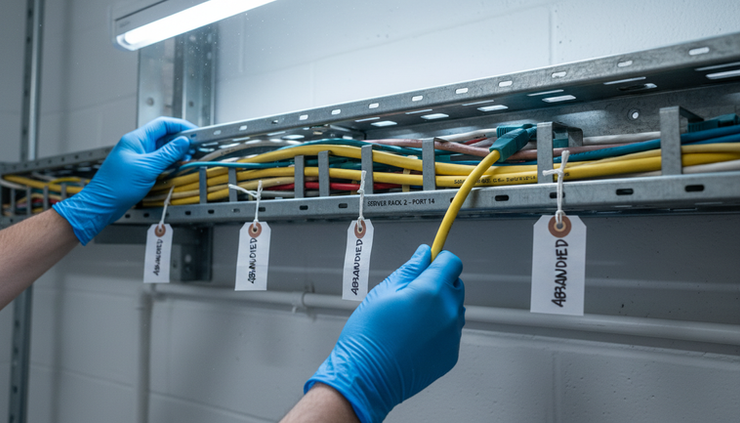
A good decommissioning job leaves behind more than open space. It leaves behind trust. When old cable disappears from racks and pathways, the remaining infrastructure becomes easier to understand.
Plan upgrades around real needs, not just faster numbers
A cabling upgrade should match the systems it needs to support. Faster switches and new access points may require better cabling, but replacing every cable in a building is not always the first answer. The right plan depends on distance, cable category, device requirements, pathway space, budget, and future growth.
Common upgrade triggers include:
Moving from older switches to faster network speeds
Adding newer Wi-Fi access points
Expanding security cameras or access control
Supporting Power over Ethernet devices
Reworking a crowded telecom room
Renovating a floor or changing work areas
Replacing cables that fail certification tests
Cable category matters. Cat5e can still support many everyday uses, but it may not be the right choice for newer high-demand links or long-term planning. Cat6 and Cat6A are common choices for modern Ethernet installations, especially where faster speeds or PoE loads are expected. Fiber may be needed for longer backbone runs, building-to-building links, or high-capacity connections between network rooms.
Distance matters too. Copper Ethernet has distance limits, and performance can suffer when installers exceed them or route cable poorly. Fiber is often the better choice for longer runs or environments with electrical noise.
Do not overlook PoE. Devices such as access points, cameras, intercoms, and access control panels may draw power through network cable. Higher power loads can create heat in large cable bundles. Cable type, bundle size, pathway ventilation, and installation practices all affect performance.
A smart upgrade plan covers:
Capacity
Plan for known needs and reasonable growth. Empty conduit, spare fiber strands, and extra patch panel ports can save future labor.
Pathways
Check trays, sleeves, conduits, and ceiling spaces before ordering cable. A design that looks fine on paper can fail if pathways are full.
Labeling
Set a naming standard before installation begins. Labels should match patch panels, wall plates, floor plans, and records.
Testing
Require certification or qualification testing based on the cable type and intended use. A link that passes basic connectivity may still fail under load.
Cutover planning
Move services in a controlled order. Keep rollback options ready for critical systems.
Upgrades also create a good chance to fix old habits. Replace patch cords that are too long, remove loops of slack from racks, standardize colors where helpful, and clean up patch panel layouts. These details may seem small, but they make support faster when something breaks.
Keep cabling healthy with simple ongoing upkeep
Upkeep is less dramatic than a major upgrade, but it keeps the entire network easier to run. A few routine habits can prevent years of clutter.
Start with labeling. Every patch panel, rack, wall jack, and backbone link should have a naming structure that people can understand. Labels should be durable, legible, and consistent. Handwritten labels may work in an emergency, but they should not become permanent unless they are clear and recorded.
Patch cable discipline is just as important. Short, properly sized patch cords improve airflow and visibility. Long cords wrapped around racks create tangles and hide mistakes. Color coding can help, but only if the standard is documented. For example, one site might use one color for access points, another for cameras, and another for user connections.
Cable management should support changes without turning into a trap. Velcro-style wraps are often better than plastic zip ties for low-voltage cabling because they are easier to adjust and less likely to crush cables when used correctly. Cables should not be bent beyond recommended limits, pulled too tightly, or pinched by rack doors and hardware.

Regular inspections should look for:
Missing or unreadable labels
Loose patch cords
Damaged cable jackets
Tight bends or pinched cables
Overfilled cable managers
Dust buildup around equipment
Blocked rack airflow
Abandoned patch cords
Wall plates that no longer match records
Set a schedule that fits the site. A small location may only need a review a few times a year. A larger site with frequent moves and device changes may need monthly checks. The right schedule is the one that catches drift before it becomes a cleanup project.
Documentation upkeep matters just as much as physical upkeep. Any time a port changes, update the record. Any time a device moves, update the record. Any time a cable is retired, update the record. If documentation always trails behind the work, it stops being trusted.
A simple change log can help. Record the date, location, ports changed, reason for change, and person who completed the work. This gives future technicians a trail when troubleshooting.
Make every project easier with a repeatable workflow
Decommissioning, upgrades, and upkeep work best when they follow a repeatable process. The details change from site to site, but the order stays familiar.
A reliable workflow looks like this:
Assess the current cabling
Walk the site, review labels, inspect racks, identify cable types, and note obvious risks.
Document what exists
Build or update floor plans, port maps, rack elevations, and photos.
Confirm active services
Trace critical links and coordinate with stakeholders before disconnecting anything.
Plan the change
Define scope, materials, schedule, outage windows, safety needs, and rollback steps.
Perform the work carefully
Remove abandoned cable, install new cable, dress racks, and protect existing services.
Test and certify as needed
Confirm performance based on the cable type and intended use.
Update records
Finish labels, drawings, test reports, and change logs before calling the work complete.
The last step is often skipped, and it is the one that protects the value of the job. A beautiful rack with outdated records is only half finished.
For nationwide organizations, consistency is especially valuable. A retail chain, healthcare group, logistics network, or school system may have many locations with different ages of cabling. Using the same labeling rules, documentation format, test requirements, and closeout checklist across sites helps field teams work faster and reduces confusion.
That does not mean every building needs the same cable. A warehouse, small clinic, restaurant, and multi-building campus each have different needs. The standard should define the process and minimum expectations, while still allowing the design to fit the space.
A repeatable workflow also reduces risk during emergencies. When a switch fails or a device goes offline, clean labels and accurate records shorten the time between finding the problem and fixing it. The payoff is not only neatness. It is faster recovery.

The simple rule for better cabling
Network cabling does not need to be mysterious. Treat it like critical infrastructure, not background clutter.
Remove what no longer belongs. Upgrade what no longer supports the work. Maintain what still has value. Then document every change clearly enough that the next person can understand it without guessing.
The best cable plant is not always the newest one. It is the one that is known, labeled, tested, and cared for. That makes decommissioning safer, upgrades smoother, and upkeep far easier to manage over time.


Comments